The General tab holds your company's name and details. They're shown throughout the Sentrido Portal.
To open it, go to Company settings → General.
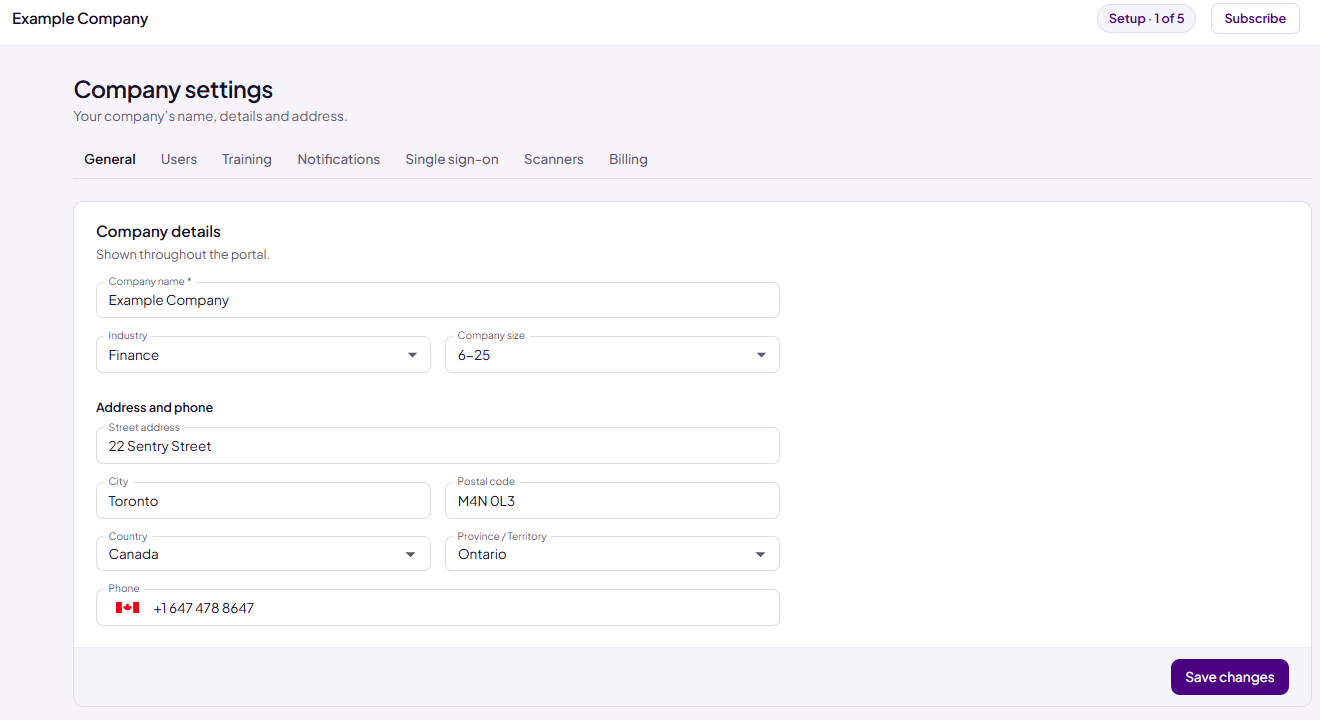
Company details
- Company name (required): your company's name as you want it to appear in Sentrido.
- Industry: the kind of business you're in, for example Finance, Health or Legal.
- Company size: how many people work at your company, for example 6-25.
Your industry and size help us give you better support.
Address and phone
These fields are optional.
- Street address and City: you can type letters in any language, plus apostrophes, slashes and the # sign, for example Unit 5/12, 100 O'Connor St or Montréal.
- Country: start typing and choose your country from the list. Common short names work too, for example USA or UK.
- State / Region: choose from the list after you pick a country. The name of this field changes to match your country, for example Province / Territory in Canada. For the United Kingdom, type it in.
- Postal code: this is called ZIP code in the United States and Postcode in the United Kingdom.
- Phone: choose the country flag or type the number starting with + and the country code, for example +1 416 555 0123.
If a value is too long, or a phone number isn't valid, Sentrido shows a message under the field. Fix it, then save.
Save your changes
- Enter or change your details.
- Choose Save changes.
You can update your company details at any time.
Note: Only the company Owner can save changes to the company details. Administrators can view them.
Delete company
The Owner also sees a Delete company section at the bottom of this tab. To learn what deleting removes and how to do it, see Deleting Your Company.
Was this article helpful?
That’s Great!
Thank you for your feedback
Sorry! We couldn't be helpful
Thank you for your feedback
Feedback sent
We appreciate your effort and will try to fix the article