The Billing tab in Company settings provides details about your company's current subscription plan and allows you to manage your subscription, view invoices, and activate a new plan using an activation code.
To access this section, navigate to Company settings → Billing.
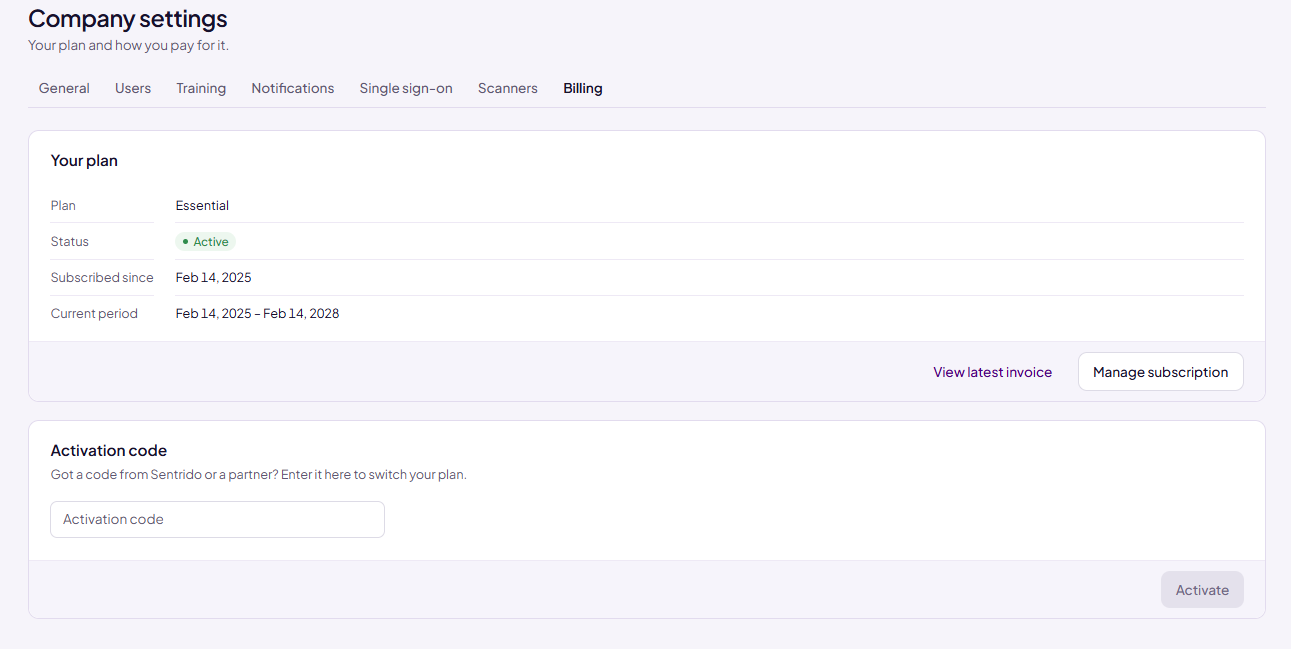
Your Plan
The Your plan section displays information about your company's current subscription.
Subscription Details:
Plan: Displays the current subscription plan (e.g., Essential).
Status: Indicates the current subscription status (e.g., Active).
Subscribed since: Shows the date when the subscription started.
Current period: Displays the start and end dates of the current subscription period.
Note: The subscription period depends on your company's plan. The dates displayed reflect the current subscription term.
Actions Available:
View latest invoice: Click this link to view and download your latest invoice.
Manage subscription: Click this button to access subscription management options, such as modifying your subscription plan, updating payment details, or canceling your subscription.
Activation Code
The Activation code section allows you to enter a code provided by Sentrido or an authorized partner to switch your subscription plan.
To activate a code:
Obtain an activation code from Sentrido or an authorized partner.
Enter the code in the Activation code field.
Click Activate to apply the code to your subscription.
Note: The Activate button remains disabled until an activation code is entered.
Permissions
Note: Only users with Owner privileges can manage the subscription. Users with Administrator privileges can apply activation codes provided by the Owner.
Was this article helpful?
That’s Great!
Thank you for your feedback
Sorry! We couldn't be helpful
Thank you for your feedback
Feedback sent
We appreciate your effort and will try to fix the article