If your company no longer uses Sentrido, the company Owner can delete the company and all of its data.
Important: Deleting a company can't be undone. Every scan, device, user and training record for the company is removed within 30 days.
Before you begin
- Only the Owner can delete the company. Administrators don't see this option.
- If you pay for a plan, cancel your subscription first: go to Company settings → Billing and choose Manage subscription. See Billing – Subscription Details.
- If you need any of your reports, save them before you delete the company.
Delete the company
- Go to Company settings → General.
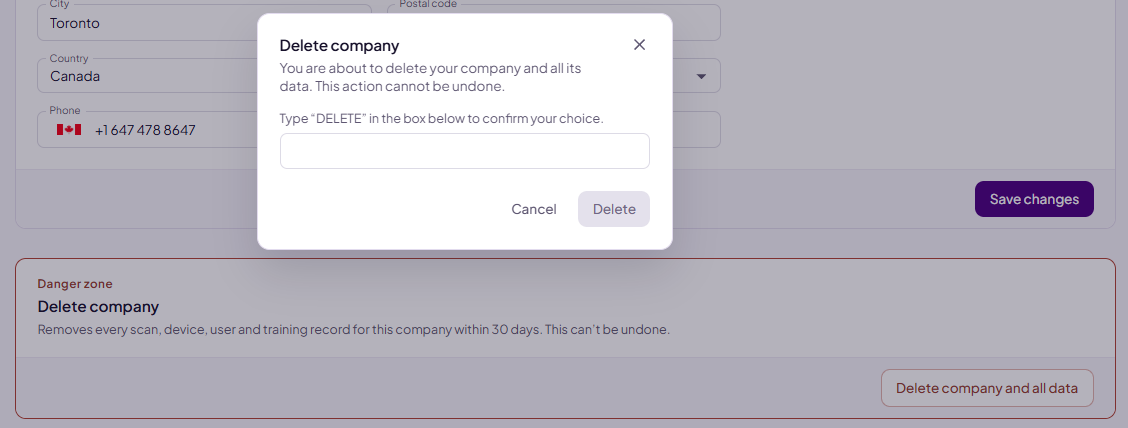
- Scroll to the Delete company section at the bottom of the page.
- Choose Delete company and all data.
- Type DELETE in the box to confirm.
- Choose Delete. The button stays greyed out until you've typed DELETE.
What happens next
- You're signed out straight away.
- The people in your company can no longer open it in Sentrido.
- Your own Sentrido account stays. You can sign in again, for example to delete your account from your profile.
Deleting your own account
As an Owner, you can't delete your own account while you still own a company. Delete the company you registered first, then sign in again and delete your account from your profile.
Was this article helpful?
That’s Great!
Thank you for your feedback
Sorry! We couldn't be helpful
Thank you for your feedback
Feedback sent
We appreciate your effort and will try to fix the article